
TachoSafe server: s2.tachosafe.net : 4046 (TCP)
1. What must be configured – and where
Remote company-card authentication and remote DDD download do not use the GPRS Server #1 / Server #2 settings. Those only carry AVL / telemetry records.
The tachograph session (ATR → APDU relay → authentication → file download) runs on a separate connection that is opened only by the WEB Tacho settings in the CAN \ Tachograph section of the Teltonika Configurator.
2. Required settings – CAN \ Tachograph page
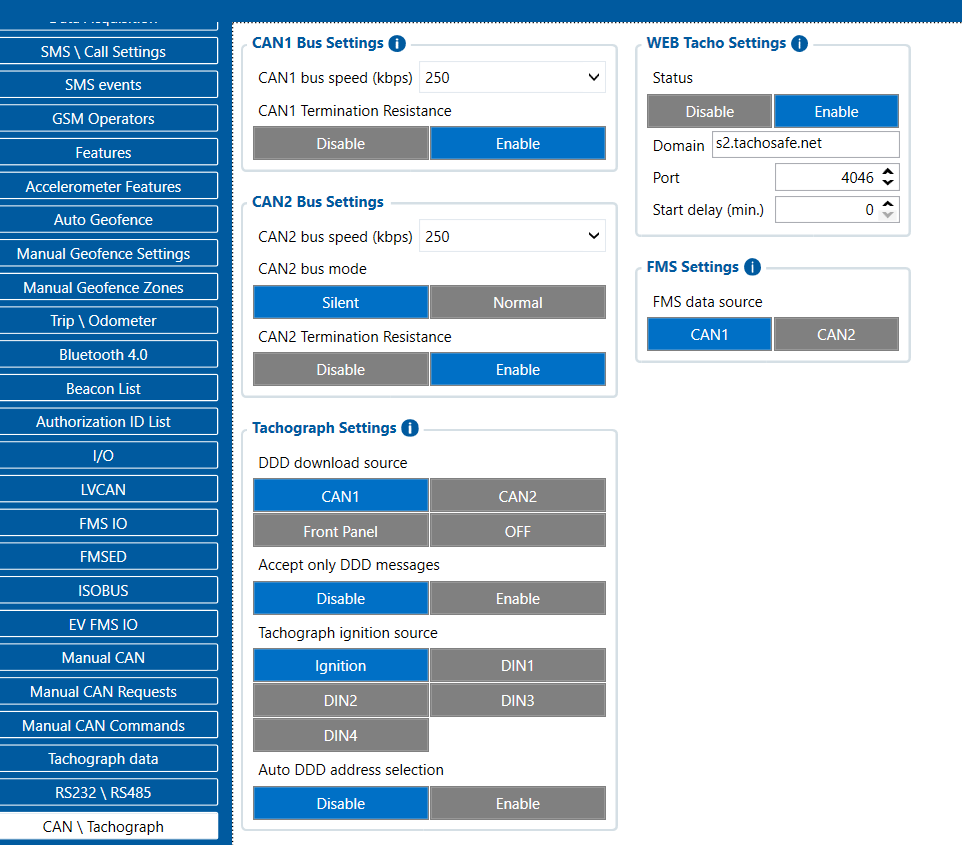
See the attached screenshot (FMC650_CAN_Tachograph.png) and the attached PDF version of this guide. The WEB Tacho settings are shown as they must be set; DDD download source and the CAN bus mode must match the actual wiring of the vehicle (see 2.2 and 2.3).
2.1 WEB Tacho Settings
| Setting | Required value | Param ID |
|---|---|---|
| Status | Enable | 200 |
| Domain | s2.tachosafe.net | 201 |
| Port | 4046 | 202 |
| Start delay (min.) | 1 (0 also works; 1 gives the modem time to attach) | 203 |
2.2 Tachograph Settings
| Setting | Required value | Param ID |
|---|---|---|
| DDD download source | The CAN line the tachograph is actually wired to (CAN1 or CAN2) | 209 0 = CAN1 1 = CAN2 |
| Tachograph ignition source | Ignition (or the DIN that is really used) | 204 |
| Accept only DDD messages | Disable | – |
| Auto DDD address selection | Enable (recommended – the unit then locates the tachograph address, normally 251, by itself) | – |
2.3 CAN bus settings for the selected line
| Setting | Required value |
|---|---|
| CAN bus speed | 250 kbps (standard for the tachograph / FMS bus) |
| CAN bus mode | Normal – must not be Silent |
| CAN Termination Resistance | Disable when the unit is tapped into an already terminated vehicle bus. Enable only if the device is physically the end of a dedicated bus. |
DDD download source is left on CAN1, or CAN2 bus mode is set to Silent. Silent mode is listen-only – the unit cannot send the requests needed for remote authentication and download, so nothing ever reaches the TachoSafe server. The line used for DDD must be Normal.3. Configuration by SMS
The device can also be configured remotely by SMS. With the default (empty) SMS username and password every command must be prefixed by two spaces:
  setparam 200:1
  setparam 201:s2.tachosafe.net
  setparam 202:4046
  setparam 203:1
  setparam 209:1
209:0 = tachograph on CAN1, 209:1 = tachograph on CAN2.
Read back the current values:
getparam 200,201,202,203,204,209
4. Verifying the installation – tachocheck SMS
Send the SMS tachocheck (also with two leading spaces when the default SMS credentials are used) to the device. Documentation: https://wiki.teltonika-gps.com/view/FMB_tachocheck
A good reply looks like:
CAN_2:111, 000, K-Line:1, Addr:251, Baud:250, Ign:1
| Field | Meaning | Required |
|---|---|---|
CAN_x | Which CAN line answered – must be the line set in DDD download source | matches 209 |
| 1st digit | Tachograph detected on the bus | 1 |
| 2nd digit | Open Remote Session succeeded | 1 |
| 3rd digit | Close Last Authentication Session succeeded | 1 |
Addr | Tachograph CAN address | 251 |
Baud | Bus speed | 250 |
Ign | Ignition state | 1 |
0, remote authentication cannot work – it is a wiring, CAN-line/mode or tachograph-configuration issue, not a server issue. Ignition must be ON (Ign:1); with ignition off the tachograph refuses the remote session.5. Checklist before reporting a problem
- WEB Tacho: Enable /
s2.tachosafe.net/4046 DDD download source= the CAN line the tachograph is wired to- That CAN line is in Normal mode (not Silent), 250 kbps
- Termination resistance correct for the installation
Tachograph ignition sourcematches the wiring, ignition ON during the test- Company card present in the TachoSafe card reader / card hotel
tachocheckreply =CAN_x:111 ... Ign:1