
The D8 setting of the RDU belongs to the status line on pin 8 of the D connector of the tachograph. Through this line the RDU reads the ignition, the driver cards and the speed of the vehicle. The remote download of the tachograph does not need it: that runs over the CAN line of the C connector.
Where to find it
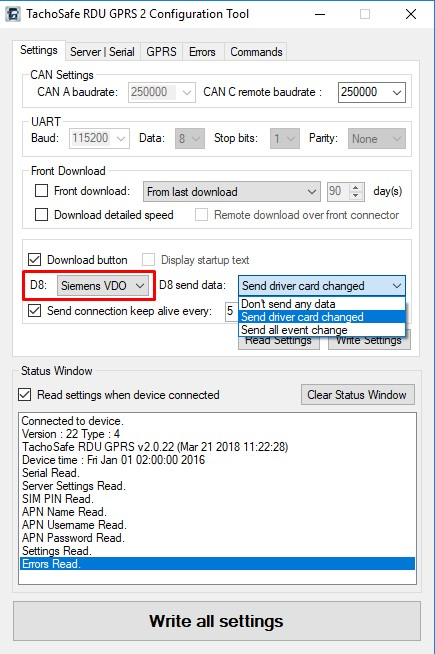
Connect the unit to the computer, start the TachoSafe RDU Configuration Tool and open the Settings tab. The two D8 fields are there:
- D8: the type of the tachograph. The choices are None, Siemens VDO, Stoneridge and Intellic EFAS. Units that support it also offer FMS Gateway. The default is Siemens VDO.
- D8 send data: what the unit reports to the server. The choices are Don't send any data, Send driver card changed and Send all event change. The default is Send driver card changed.
Change it only if needed
- Normally leave both fields as they are. A unit with recent firmware also recognizes the type of the tachograph by itself. If a unit was moved to another make of tachograph and the driver card changes are no longer reported, update its firmware or set the right type.
- Leave D8 send data at Send driver card changed. Do not use Send all event change unless support asks you to.
- If the driver card changes are not reported or the ignition is not detected, check the wiring of the D connector and contact support.
Contact support
Open a ticket and send the terminal ID, the make and model of the tachograph, the text of the Status Window after you read the settings, and what you see on the web site.