
When the LED of the download unit blinks, you can connect the unit to the computer and start the Configuration Tool to see the error flags that are set on the unit.
Or you can count the blinks and find the error in the list below.
A green LED means everything is OK. A red LED means that the unit is connected to the server but there is an error. Count the blinks: for example 7 blinks means CAN error. If more errors are set, the unit blinks them one after the other.
GPRS2, 4G and uRDDv2 units with firmware released before November 2026 only blink errors 1 to 8. Use the Configuration Tool to see the others.
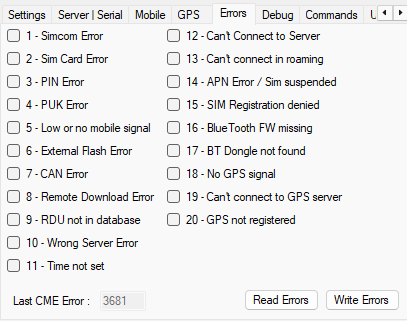
- Simcom Error - The unit needs to be replaced.
- Sim Card Error - There is no SIM card in the terminal or the SIM card is not recognized. If a SIM card is inserted and it works in a telephone, clean the contacts of the SIM card holder with some alcohol.
- PIN Error - The PIN code is not correct. Enter the right PIN code in the GPRS settings and press the Write button.
- PUK Error - The PIN code was entered wrong three times and now the SIM card asks for the PUK code. Take out the SIM card and enter the PUK code in a phone to unlock it.
- Low or no mobile signal - The mobile signal is not strong enough for the unit to go online. (On firmware older than 29 this error means BT Dongle not found.)
- External Flash Error - The flash memory of the terminal is damaged, the unit needs to be replaced.
- CAN Error - The tachograph does not answer on the CAN. This is normal for a parked vehicle. If it stays while the engine runs, see No response received from CAN, vehicle not under ignition.
- Remote Download Error - The tachograph answers on the CAN but refuses the remote download. A workshop must switch on remote download in the tachograph, see Remote downloading not enabled with service card or vehicle not under ignition.
- RDU not in database - Open a ticket when you see this error.
- Wrong Server Error - Open a ticket when you see this error.
- Time not set (does not blink) - Not relevant: the terminal gets the time from the mobile network, from the tachograph or from the RDU Manager.
- Can't Connect to Server - The terminal can connect to the internet but not to our server. If the RDU Manager can connect to the server that is set in the Server tab, the SIM card has no access to this server.
- Can't connect in roaming - The unit is in roaming and Enable Roaming is not ticked in the GPRS tab, so the unit can't connect to our server.
- APN Error / Sim suspended - The APN entered in the GPRS tab is probably not correct for the SIM card. Check the APN settings with the provider of the SIM card.
- SIM Registration denied - The SIM card can't connect to the mobile network. The SIM card is probably not registered to the network or it has expired.
- BlueTooth FW missing (blinks only in front download mode) - The unit can't work in front download mode, because the SIMCOM module has no Bluetooth firmware.
- BT Dongle not found - In front download mode the unit needs the BT Dongle to download the tachograph and it can't find it.
- No GPS signal - Only on units with GPS: the unit can't get a GPS fix.
- Can't connect to GPS server - The unit can't connect to the GPS server that is set.
- GPS not registered - GPS tracking was not switched on in the web interface. See How to Enable GPS Tracking for LTE GPS Devices.
- Bad firmware image - The firmware file the unit received was not usable and was refused. The unit keeps its old firmware. Open a ticket when you see this error.
You can clear the error flags when you untick them and press the Write Errors button, but if the cause of the error happens again, the flag is set again.
You can read the error flags with the Read Errors button.