
If the smart card reader or the TachoSafe Smartcard Hotel disappears, or the smart card reader service stops working, Windows has probably switched the USB port off to save power. Disable the USB selective suspend.
- Press the Windows key and type Edit power plan. Open it.

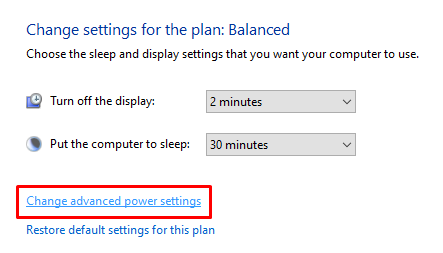
- In the power plan settings press Change advanced power settings.
- Find USB settings and set USB selective suspend setting to Disabled. On a laptop set it for both On battery and Plugged in. Press OK.
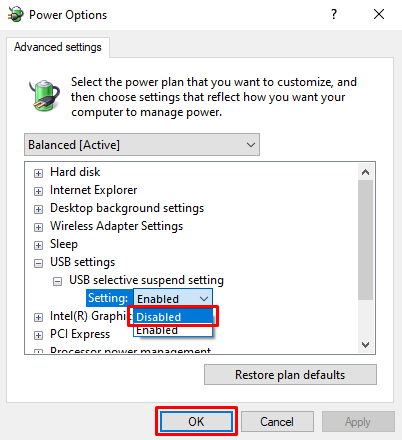
Now Windows does not switch off the smart card readers when they are not used for a while. The screenshots are from Windows 10, the menus are similar in Windows 11.
Good to know
- The same setting is needed for the TachoSafe Smartcard Hotel.
- On Linux, the Linux installer of the Multi Company Manager switches off the USB power saving.
- If a company card reader cannot be reconnected, the log of the Multi Company Manager says why. When you refresh the card readers while a company card is in use by a download, the program asks first.
Contact support
If the reader still disappears, open a ticket and send the log of the program and what the Device Manager shows for the reader.