
The TachoSafe Smartcard Hotel is a device with 40 separate smart card readers. It replaces the individual USB card readers of the remote authentication and works with a single USB port of your computer. It takes up 31 x 21 x 6 cm, without cards, and fits on a desk or on a wall. You need a computer, a USB cable and a 12 V 1 A power supply. The USB cable and the power supply are included.
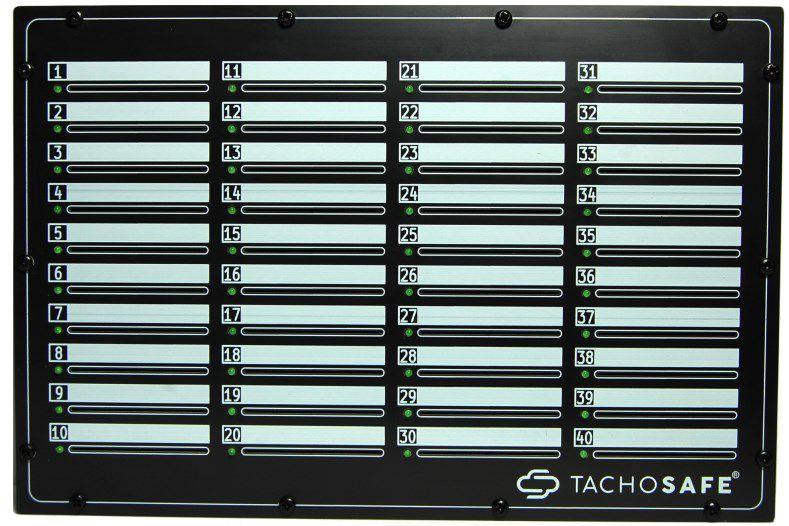
The computer sees the device as a virtual serial port and a disk drive. The disk drive is used for firmware updates and for the communication log files. The built-in card readers are reached through the serial port. Up to 3 hotels can be connected to one computer.
Installation
- Connect the power supply and the USB cable. Plug the USB cable directly into the computer, not into a hub. Without the power supply no card is detected.
- A disk drive named TachoSafe CardHotel appears automatically.
- Start the TachosafeCardHotelDriver_Install.exe or run the TachosafeCardHotelDriver_Install.sh in Linux and follow the instructions on the screen.
Setup
- Connect the hotel before you start the Multi Company Manager. The program only sees the hotel if it is connected when the program starts.
- Download and install the TachoSafe RDU Multi Company Manager (Downloads).
- Start the program. It detects the Smartcard Hotel by itself.
- Insert the company cards in the slots and assign each card to its company, see adding a company card.
A slot that turns red from time to time: right-click it in the Smart card readers tab, it turns green again.
Troubleshooting
If the device does not work, open the Device Manager on the computer. It shows the hotel as a COM port under Ports (COM & LPT) and as a disk drive under Disk drives. It is not shown as a smart card reader.
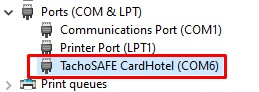
Problem: The TachoSafe Card Hotel appears under Other devices.
Solution: The driver was not installed successfully. Follow the installation steps above.
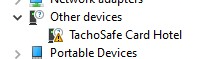
Problem: The hotel is not found after the computer was restarted.
Solution: Unplug the power supply and the USB cable and wait 10 seconds. Connect the power supply first, then the USB cable. Wait a minute and start the Multi Company Manager.
Problem: The hotel disappears from the manager and from the device list.
Solution: Disable the USB selective suspend in Windows and install the latest Card Hotel Driver. On Linux the Linux installer switches off the power management of the USB.
Contact support
If the problem stays, open a ticket and describe what the Device Manager shows. The Contact Support item of the Card Hotel Driver in the system tray collects the logs.